Subscribe to earn points on your next purchase and get complimentary shipping on orders of $49+!
See it in action
Free shipping on orders $100+
3 Complimentary samples for each order
Secure Payment
PDP: Description - Desktop
Discover
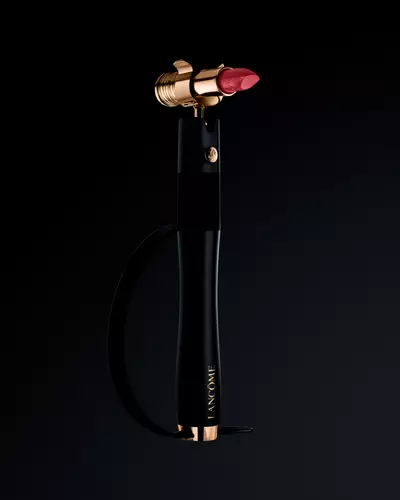
HAPTA Adaptive Lipstick Applicator
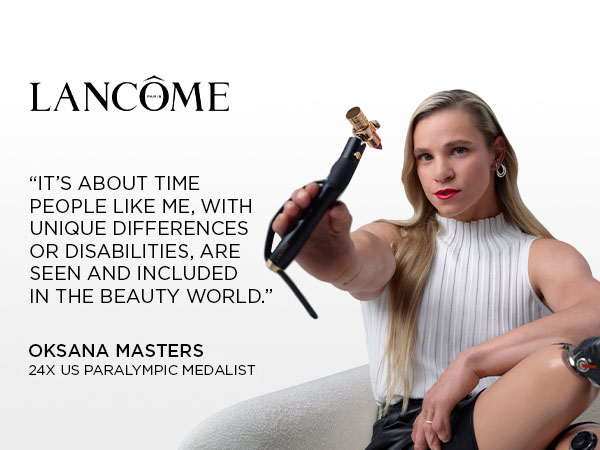
A NEW ERA OF INCLUSIVE BEAUTY
HAPTA is a groundbreaking adaptive lipstick application device designed for those with limited hand, wrist, and arm mobility. This lightweight, handheld applicator has motion-stabilizing technology embedded with real-time sensors simulating wider range of motion for steady, independent lipstick application.
• Self-leveling Technology: For stabilization during lipstick application
• Comfortable Grip: This lightweight device is easy to hold and has a strap for greater stability
• Beyond Lancôme Lipsticks: The lipstick adapter was designed to fit most standard-sized lipstick bullets.
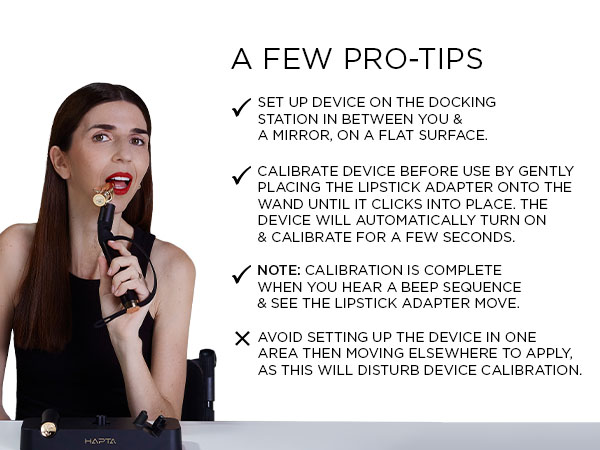
• First, charge your device on the docking station for a minimum of 4 hours.
• Important: Before beginning the next step, be sure the docking station is parallel to you, and the docking station is between you and a mirror.
• Once your device is charged, remove the lipstick from the lipstick holder on the docking station and gently insert into the lipstick adapter.
• Remove the lipstick adapter from the docking station and place it on top of the HAPTA wand, aligning the gold rose on the adapter with the white dot on the wand. You will feel a magnetic click indicating that the adapter is securely on the wand.
• Next, wait a moment for the device to calibrate. You will know calibration is complete once you see the device move slightly and hear a beeping sequence.
• Important: Do not move to a new location to apply after calibrating the device. It is important you apply where the device was calibrated.
• Hold the device vertically and apply. You may notice the device move slightly while applying to compensate for your motion. Note, avoid holding the device horizontally when applying.
• Pro-Tip: It may help to turn the bullet so the angled tip of the lipstick aligns with your bottom lip, then slightly turn again so the angled tip then aligns with your top lip.
Product
Benefits
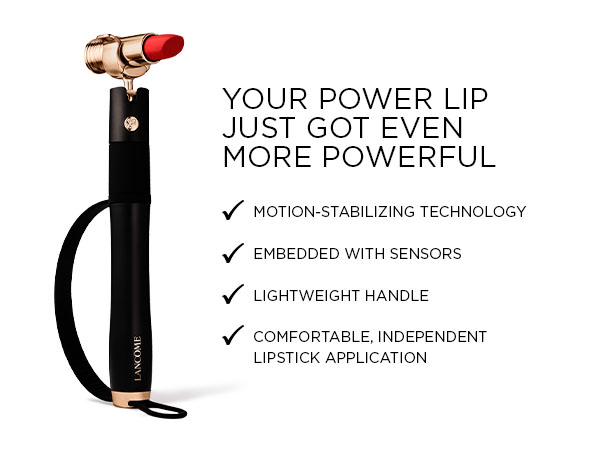
MOTION-STABILIZING TECHNOLOGY
EMBEDDED WITH SENSORS
LIGHTWEIGHT HANDLE
COMFORTABLE, INDEPENDENT LIPSTICK APPLICATION
PDP: Description - Mobile
A NEW ERA OF INCLUSIVE BEAUTY
HAPTA is a groundbreaking adaptive lipstick application device designed for those with limited hand, wrist, and arm mobility. This lightweight, handheld applicator has motion-stabilizing technology embedded with real-time sensors simulating wider range of motion for steady, independent lipstick application.
• Self-leveling Technology: For stabilization during lipstick application
• Comfortable Grip: This lightweight device is easy to hold and has a strap for greater stability
• Beyond Lancôme Lipsticks: The lipstick adapter was designed to fit most standard-sized lipstick bullets.
• First, charge your device on the docking station for a minimum of 4 hours.
• Important: Before beginning the next step, be sure the docking station is parallel to you, and the docking station is between you and a mirror.
• Once your device is charged, remove the lipstick from the lipstick holder on the docking station and gently insert into the lipstick adapter.
• Remove the lipstick adapter from the docking station and place it on top of the HAPTA wand, aligning the gold rose on the adapter with the white dot on the wand. You will feel a magnetic click indicating that the adapter is securely on the wand.
• Next, wait a moment for the device to calibrate. You will know calibration is complete once you see the device move slightly and hear a beeping sequence.
• Important: Do not move to a new location to apply after calibrating the device. It is important you apply where the device was calibrated.
• Hold the device vertically and apply. You may notice the device move slightly while applying to compensate for your motion. Note, avoid holding the device horizontally when applying.
• Pro-Tip: It may help to turn the bullet so the angled tip of the lipstick aligns with your bottom lip, then slightly turn again so the angled tip then aligns with your top lip.
MOTION-STABILIZING TECHNOLOGY
EMBEDDED WITH SENSORS
LIGHTWEIGHT HANDLE
COMFORTABLE, INDEPENDENT LIPSTICK APPLICATION
PDP: Full Width Image
PDP: Full Width Image
PDP: Full Width Image
PDP: Full Width Video
PDP Slot 2 Section
PDP: FAQs
Frequently Asked Questions
HAPTA is for those with limited hand, arm & wrist mobility who have difficulty applying lipstick. If you have difficulty:
Moving your arm left, right, up and down
Gripping and holding a lipstick
Using a pinching motion with fingers to pick up a lipstick
Rotating your wrists in a full circle
Then HAPTA may be right for you. Please note, HAPTA was not designed to compensate for tremors.
Inside your device you will receive a docking station which will house: the HAPTA wand, a lipstick adapter designed to fit most standard-sized lipsticks, and a lipstick holder embedded in the docking station. A charging adapter and a charging cable are also included. Please note that a separate USB-C charging block will be needed and the lipstick is sold separately.
First, place the HAPTA wand on the docking station. Then charge your device on the docking station by aligning the white dot on the charging adapter to the white dot on the HAPTA wand. Your charging adapter should be attached to the charging cable, which should be plugged into a USB-C charging block. Charge your device for a minimum of 4 hours prior to use.
Important: Before beginning the first step, be sure the docking station is parallel to you and the docking station is between you and a mirror.
Step 1: Once your device is charged, remove the lipstick from the lipstick holder on the docking station and gently insert into the lipstick adapter. Remove the lipstick adapter from the docking station and place it on top of the HAPTA wand, aligning the gold rose on the adapter with the white dot on the wand. You will feel a magnetic click indicating that the adapter is securely on the wand.
Step 2: Wait a moment for the device to calibrate. You will know calibration is complete once you see the device move slightly and hear a beeping sequence.
Important: Do not move to a new location to apply after calibrating the device. It is important to apply where you calibrated the device.
Step 3: Hold the device vertically and apply. You may notice the device move slightly while applying to compensate for your motion. Avoid holding the device horizontally when applying.
First, ensure your device is fully charged, aligning the white dot on the wand with the white dot on the charger. Next, after placing the adapter on the wand, be sure to calibrate the device while it’s still on the docking station and wait until you see the device move slightly and hear the beeping sequence. If challenges continue, please contact our Customer Care team for further troubleshooting and guidance.
HAPTA was designed to fit most standard-sized lipsticks.
HAPTA is an adaptive lipstick application device and should not be used to apply any other makeup products.